Workflows

A workbench for the moments that make projects move.

The product is organised around the control loops a PM actually lives through—not around a feature catalogue.

Download

How PMCW fits

Keep the detail in its source system. Keep the control picture here.

Jira and team delivery

Keep tickets and delivery detail in Jira. Manually capture selected commitments, owners, dates, and meeting decisions in PMCW when they matter to the PM’s follow-up.

SharePoint and document stores

Keep official documents in SharePoint or your DMS. Use supported document references and readiness context in PMCW to track the evidence needed for a review.

MS Project and planning tools

Keep the detailed schedule in the planning tool. Maintain selected milestones and management follow-up in PMCW; no schedule synchronisation is promised.

ERP and controlling records

Keep official bookings and financial records authoritative in ERP. Record selected management decisions and follow-up in PMCW. ERP import or synchronisation is not offered by the current public product.

These examples describe selective, manual coexistence. PMCW does not provide automatic synchronisation or a Jira connector. Keep the context that helps you decide and follow up, rather than a second copy of every source record.

Questions about existing systems
01

Today → Project → Action

Weekly portfolio triage

Starting signal. A project, action, or gate is asking for attention.

Workbench action. Open Today, identify the dominant reason, and choose the next review move.

Resulting output. A ranked next move with owner, due date, and project context.

Explore this control loop
02

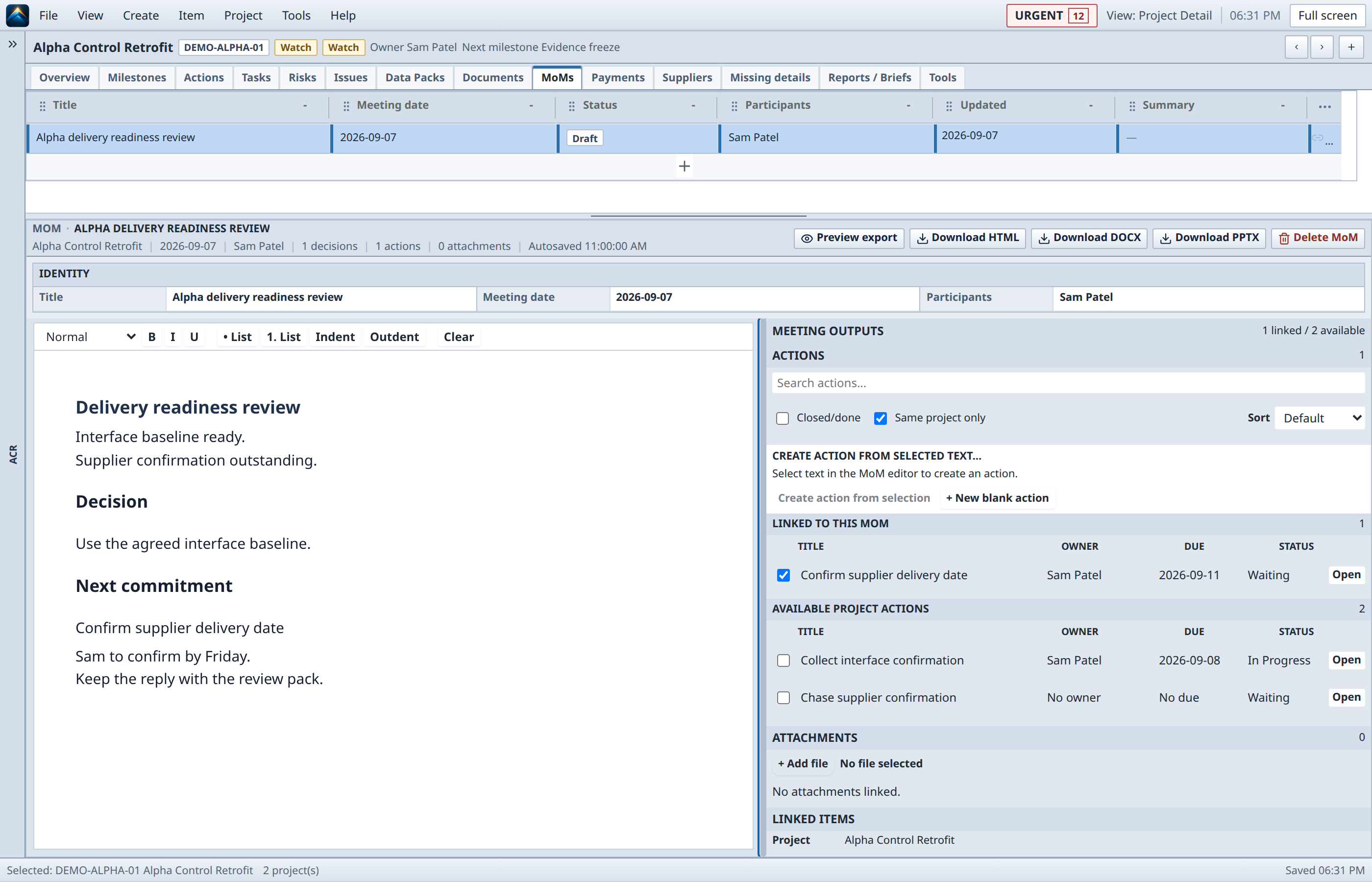
Meeting → Action Tracker

Meeting to action

Starting signal. A decision or selected meeting text needs to survive the room.

Workbench action. Capture it as a linked action with owner, due date, and project context.

Resulting output. An action that remains attached to the meeting and the project record.

Explore this control loop
03

Gate → Evidence → Report

Gate readiness

Starting signal. A review is approaching and evidence may still be missing.

Workbench action. Inspect documents, data packs, and linked deliverables before the meeting.

Resulting output. A visible readiness picture and the gaps that still need an owner.

Explore this control loop
04

Documents → Export

Review-ready handoff

Starting signal. A conversation needs the supporting files, notes, and outputs in one place.

Workbench action. Assemble the review material, then export a selected review package through an approved sharing path.

Resulting output. An explicit, controlled handoff with no automatic synchronisation.

Explore this control loop
05

Project → Closure

Project closure

Starting signal. Remaining work, final documents, and delivery packs still need confirmation.

Workbench action. Walk the closure path before the project is marked closed.

Resulting output. A durable record of what was finished and what was handed on.

Explore this control loop
A real Alpha readiness review records the baseline decision and the next supplier commitment.
Review decision / linked next moveCaptured from the real product with fictional demo data.Open full resolution

The point of the loop

Leave every review with a next move.

The workbench keeps context close enough that a discussion can become a decision, a decision can become an action, and an action can return to the project picture with its source still visible.

Read the documentation